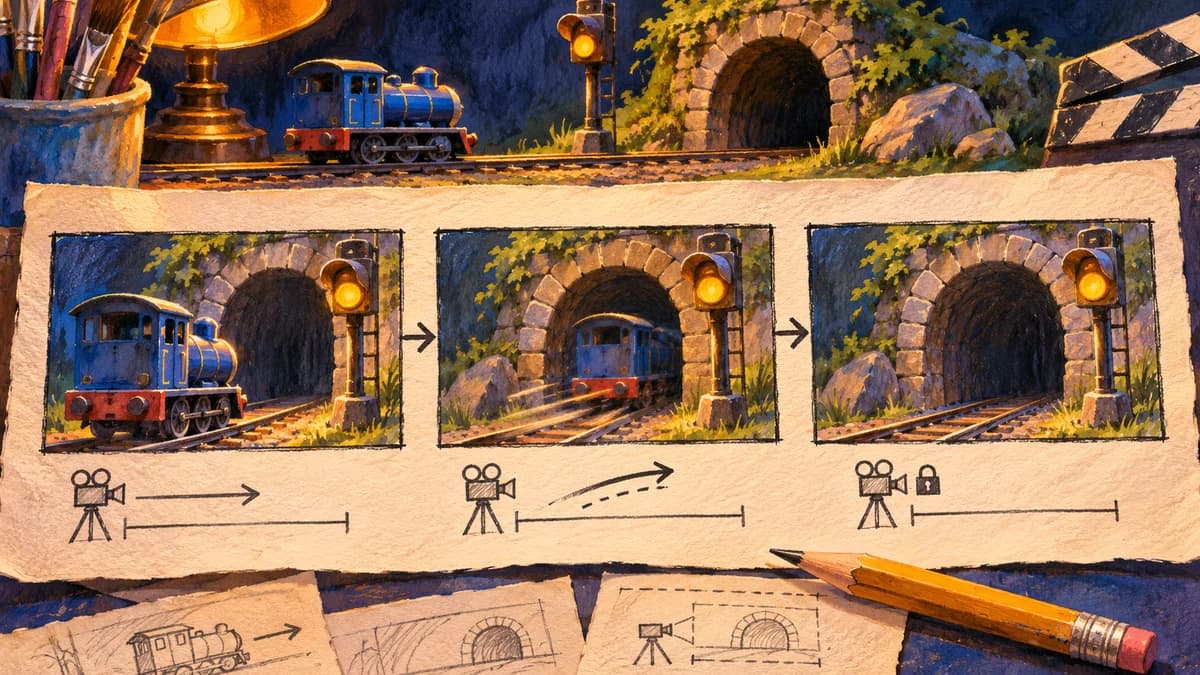
PAN 2 can turn one storyboard frame and a timed description into a clip you can review before committing to a shot. The Institute of Foundation Models at MBZUAI released PAN 2 on November 10, 2026. IFM provides its own weights and code under Apache 2.0. Its image-to-video path takes one starting frame and a structured description. The model card documents 704 pixels high by 1248 wide, 24 fps, and up to 20 seconds for a clip.
That makes it a candidate for testing where an object should travel, when to stop a camera move, and whether the result reads in an edit. For a sequence with a fixed final composition or continuity across several shots, keep those frames in the storyboard and check them separately. PAN 2 conditions on the start and leaves the later frames to generation.
Pick one motion question for the first shot
Suppose a blue model train needs to disappear into a tunnel. Your shot has one job: show that the train went through the entrance and give the editor time to cut from an empty frame. Make a landscape start frame with the train facing the tunnel, rails leading into the opening, and an amber signal beside the track. Keep the entire path readable at thumbnail size.
This six-second timing sheet is a teaching example. The cover illustrates the plan, and AniKuku has not generated or benchmarked the clip with PAN 2.
| Time | Action in the scene | Camera |
|---|---|---|
| 0–2 s | The train waits beside the amber signal. | Hold a low three-quarter view. |
| 2–5 s | The train follows the rails into the tunnel and clears the entrance. | Track gently right, keeping the entrance in frame. |
| 5–6 s | The entrance remains empty and the signal stays amber. | Stop the camera and hold on the opening. |
Turn the timing sheet into PAN 2 input
- Save the first panel as an image. In the IFM launcher, choose the image-to-video example, point
image_pathat that file, and setduration_secto6. At 24 fps the launcher's frame calculation gives 145 frames. Use the relevant runtime's image and duration settings if you choose a different path. - Feed the timing sheet and first-frame description into the documented prompt rewriter. Ask for one continuous shot, with the blue train as a persistent subject and the tunnel and signal as fixed landmarks. Review
eventsandtime_range_secin the structured caption, and keepcamera_motiondistinct from what the train does. Use the runtime's supplied negative prompt when starting out. The native launcher passes the final prompt through without rewriting it. - Start from the documented example for your runtime. Diffusers provides a Python pipeline and vLLM-Omni documents a serving route with structured JSON serialized as prompt text. IFM's basic shell launcher starts one worker per GPU and each loads the full model, so adding GPUs there increases prompt throughput. For memory planning, check the documented offload or model-parallel options for the runtime you actually plan to use. IFM recommends its prompt and video guardrails.
Review the draft before adding another shot
Watch the clip once without scrubbing, then check the frames around seconds 2 and 5. Did the train follow the rails until it was fully occluded, or did it disappear early? Is the signal on the same side of the track? Does the camera settle long enough for the cut? If the motion reads but the entrance drifts out of frame, repeat the shot with the same image, seed and settings and change the middle camera instruction to a locked view. That isolates one change for review.
IFM's model card reports that about two in three simulated plans missed at least one step in its evaluation, and describes appearance drift across clips. Those are reasons to review short shots individually. They do not give an acceptance rate for your storyboard. If the next shot needs the exact same tunnel or train, prepare a matching first frame from the established design and check both shots at the cut.
For a sequence with several shots, start with the script-to-storyboard workflow and editable shot list. The PAN 2 workflow above runs in external tools. AniKuku currently has no PAN 2 integration.
Sources checked November 13, 2026. IFM technical report · Official model card and weights · IFM inference guide.